Grand Theft Auto Poster
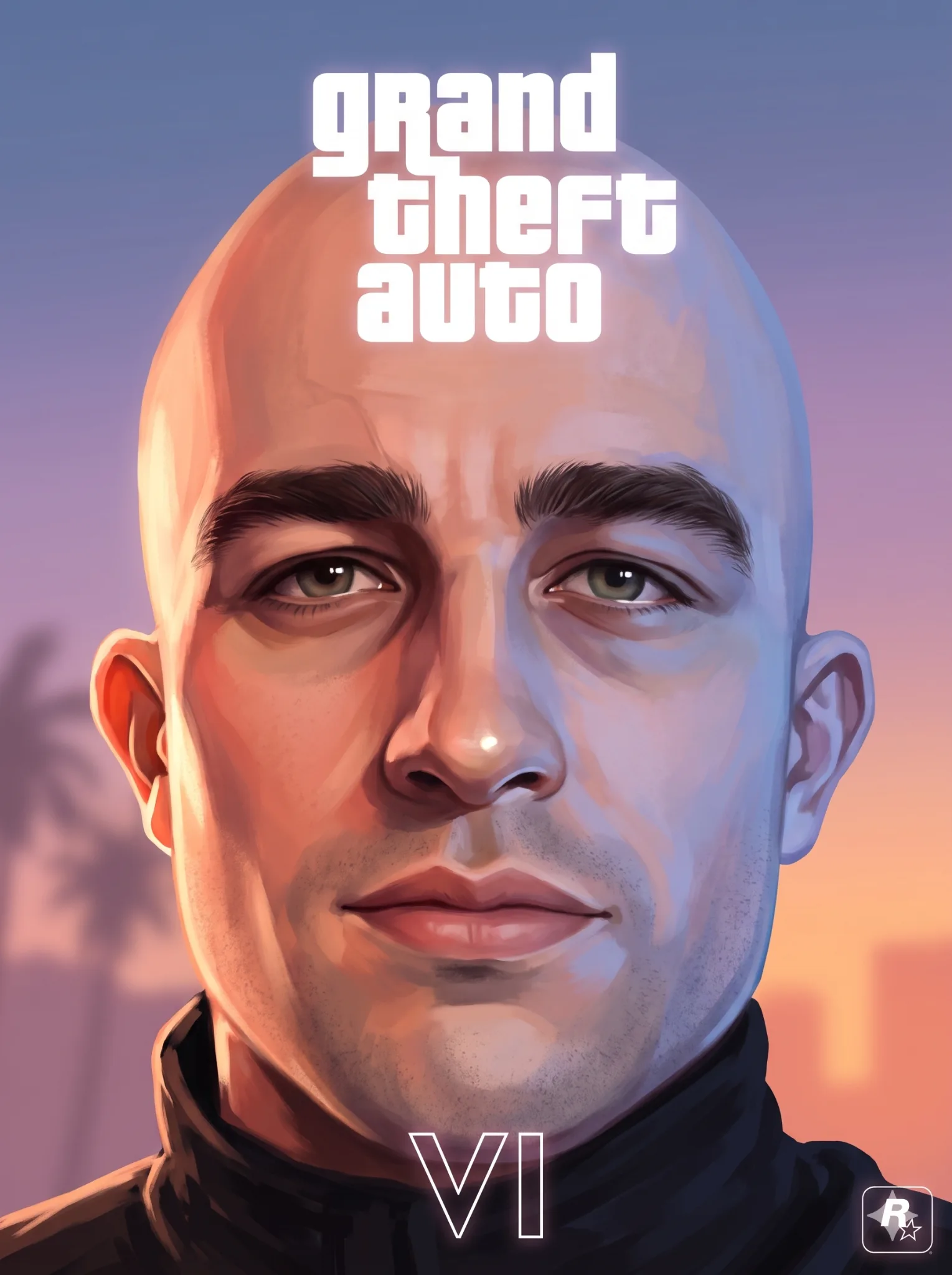
Model: Nanobanana · Category: Posters
Transform the uploaded reference image into a premium, highly detailed, 3D-informed digital painting with a distinctive Grand Theft Auto: Vice City sunset aesthetic.
CRITICAL: PRESERVE THE ORIGINAL IMAGE.
Use the uploaded image as the exact visual reference. Preserve the subject's identity, facial features, expression, pose, anatomy, clothing, accessories, camera angle, perspective, composition, background layout, horizon, object placement, proportions, and spatial relationships.
Do not redesign, replace, add, remove, or reposition any existing scene elements. The result must remain immediately recognizable as the original image.
1. FOREGROUND — CHARACTER & OBJECT RENDERING
Render the foreground using sophisticated hand-painted techniques combined with sculptural 3D-informed volume.
- Preserve the exact character identity, face, expression, hairstyle, pose, and outfit.
- Create believable anatomy, dimensional facial planes, natural proportions, and realistic clothing structure.
- Use connected shadow masses, broad midtones, and large, sharply defined highlights.
- Render individual hair strands, facial hair, eyebrows, eyelashes, and flyaways using fine tapered brush strokes.
- Add detailed fabric folds, stitching, seams, thread details, pores, stubble, and material-specific surface characteristics.
- Give metal, glass, skin, hair, and fabric distinct painted material properties.
- Use visible directional brushwork, clean planar transitions, and crisp accent details.
The foreground should look meticulously hand-painted, sculptural, dimensional, and highly detailed. Avoid smooth airbrush blending and generic filters.
2. ENVIRONMENT — VICE CITY SUNSET
Create a luminous retro Miami / Vice City-inspired sunset atmosphere.
Use a beautiful atmospheric gradient transitioning through:
- Dusty periwinkle and muted sky blue.
- Lavender, mauve, and dusty violet.
- Warm peach, coral, apricot, and pale orange near the horizon.
Keep clouds subtle and faint.
Use large muted plum, dusty violet, and mauve palm silhouettes while maintaining their original positions and proportions.
Preserve the existing environment layout exactly. Keep buildings, rooflines, architectural divisions, windows, signage hints, streets, palm trees, and skyline recognizable.
Render the background as a simplified pastel illustration with:
- Softened edges.
- Pale grouped color tones.
- Reduced architectural detail.
- Low texture density.
- Compressed contrast.
- Lower saturation.
- Flatter, less dimensional surfaces.
Visual hierarchy: The foreground must be richly detailed, dimensional, and visually dominant. The background must be lighter, softer, flatter, and atmospheric.
3. DISTINCTIVE PAINTERLY RENDERING
Apply a premium 3D-informed digital painting technique.
Use:
- Sculpted 3D-like forms.
- Large planar value blocks.
- Clearly separated directional brush strokes.
- Distinct painted shape groups.
- Crisp hard-soft edge control.
- Clean transitions between light and shadow.
- Minimal texture noise.
- No black outlines or contour layers.
Avoid photorealism. The image should feel like sophisticated concept art created through a combination of digital painting and 3D sculptural lighting.
4. DRAMATIC DUAL-COLOR LIGHTING
This is an essential visual characteristic.
Apply two equally strong opposing light sources across the foreground.
Warm illumination: Exaggerated peach, coral, apricot, pale gold, and glowing pure-white highlight planes across all warm-facing surfaces of faces, hair, hands, clothing, and objects.
Cool illumination: Broad blue and blue-violet illumination across opposing surfaces. This must behave as a genuine secondary light source, not merely shadows or thin rim lighting.
Both light sources must cover substantial surface areas, follow the geometry of the objects, and create bold, clean, sharply defined planar transitions.
Use:
- Large burned-white highlights.
- Broad blue-violet illuminated planes.
- Deep grouped shadow masses.
- Strong midtone separation.
- Visible individual brush marks.
Do not make the lighting subtle or limited to object edges.
5. MATERIALS & TEXTURES
Maintain distinct, dimensional material rendering.
- Skin: sculpted planes, pores, subtle stubble, warm highlights, and cool opposing light.
- Hair: individually painted tapered strands, layered locks, and fine flyaways.
- Clothing: crisp folds, stitching, seams, and thread details.
- Metal: sharp reflections and bright accent highlights.
- Glass: controlled transparency and crisp reflective planes.
- Hard surfaces: grouped reflections and clearly defined tonal transitions.
Keep all textures painterly, not photographic.
6. TYPOGRAPHY — TOP CENTER
Add the exact lowercase text:
grand theft auto
Stack the three words vertically at the top center.
Typography:
- Thick, rounded geometric lowercase block letters.
- Solid, flat white lettering.
- Clean, consistent letterforms.
- A very subtle, closely contained soft white glow.
Do not use an existing GTA logo or logo artwork.
No shadow, border, stroke, outline, bevel, extrusion, 3D depth, duplicate lettering, or offset copy.
TYPOGRAPHY ISOLATION: Only the title lettering and its subtle, tightly contained white glow may alter the background pixels in the title area. Preserve all surrounding background pixels and details exactly.
7. ROMAN NUMERAL VI — BOTTOM CENTER
Add a medium-sized white-outlined VI at the lower-bottom center.
- Thin geometric white linework.
- No fill.
- No gradient.
- No bevel or texture.
- No extrusion or drop shadow.
- The V must consist of two straight diagonal lines meeting at a sharp, acute bottom point.
- Add only a clear, soft white glow around the outline.
Keep the VI clean, minimal, and properly centered.
8. ROCKSTAR LOGO — BOTTOM RIGHT
Place only a small Rockstar logo in the bottom-right corner.
Do not add:
- PS5 logo.
- Xbox logo.
- Platform branding.
- HUD elements.
- Interface icons.
- Additional text.
- Unrequested decorative graphics.
9. STRICT NEGATIVE INSTRUCTIONS
Do not introduce:
- Photorealistic or live-action rendering.
- Generic poster filters.
- Halftone effects.
- Muddy or loose painting.
- Sketchy brushwork.
- Plastic skin.
- Smoothly blended faces.
- Simplified hair masses.
- Weak midtones.
- Small or timid highlights.
- Thin rim-light-only effects.
- Black outlines.
- Filled or gradient VI.
- Colored VI glow.
- VI drop shadows.
- Altered facial identity.
- Changed clothing or pose.
- Modified background composition.
- Extra objects, logos, or graphic elements.
FINAL OUTPUT
Create a premium, high-resolution digital painting that combines sculptural 3D-informed character rendering, detailed hand-painted foreground textures, dramatic warm-and-cool opposing illumination, and a simplified luminous Vice City sunset background.
The result should feel like premium GTA Vice City-inspired game key art.
Most important: Maintain maximum fidelity to the uploaded reference image. Change the rendering style, lighting, and specified typography — not the original scene, identity, pose, or composition.