Vector Portrait Transformation
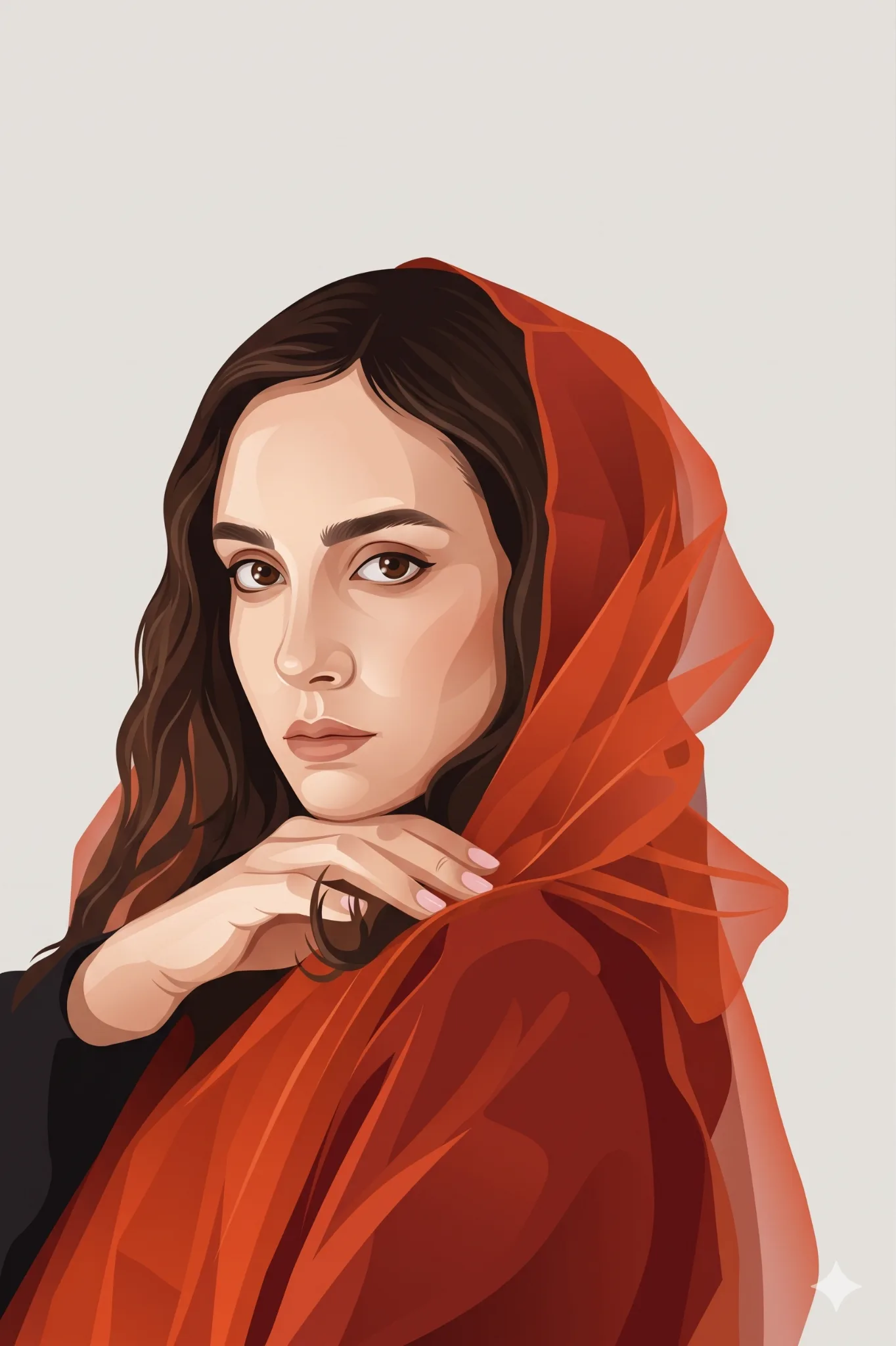
Model: Nanobanana · Category: Anime / Illustration
# Universal Photo-to-Vector Portrait Transformation

**Objective:** Transform the uploaded reference photograph into a premium, modern vector-style editorial portrait illustration. Use the uploaded image as the sole reference for the subject's identity and preserve their recognizable appearance.

### 1. Identity Preservation
- Use the uploaded photo as the only facial and identity reference.
- Preserve the subject's recognizable facial structure, face shape, skin tone, eyes, eyebrows, nose, lips, hairstyle, hairline, and distinctive features.
- Maintain the subject's apparent age, gender presentation, and natural expression.
- Retain glasses, facial hair, earrings, and other visible accessories when present.
- Do not replace the subject's face with a generic model or beautify it to the point of losing their likeness.
- If the photo contains multiple people, preserve the identity of every person and maintain their relative positions.

### 2. Illustration Style
Convert the photograph into a sophisticated semi-realistic vector portrait with:
- Clean geometric shapes and precisely defined contours.
- Smooth color gradients and layered geometric shading.
- Crisp vector edges, simplified details, and carefully controlled highlights.
- Subtle tonal transitions that preserve facial depth and natural anatomy.
- A contemporary flat illustration aesthetic with a refined editorial finish.
- A balance between realistic facial recognition and stylized graphic design.

The illustration should feel like premium digital artwork created by a professional illustrator, not a photograph with a filter applied.

### 3. Clothing and Styling
Recreate the clothing visible in the original photograph using clean, simplified vector shapes.

When the original outfit is unclear or unsuitable for the desired composition, use a stylish smart-casual alternative, such as a plain T-shirt layered with a casual jacket, overshirt, or minimalist shirt.

Maintain the original person's gender presentation and personal style. Preserve visible glasses, jewelry, accessories, and distinctive clothing details whenever possible.

Do not force glasses, facial hair, a hairstyle, or a particular outfit onto the subject if these details are not present in the reference, unless explicitly requested.

### 4. Pose and Composition
- Create a polished bust portrait, showing the head, shoulders, and upper torso.
- Preserve the original head orientation, gaze direction, and expression where practical.
- If the original photograph has an unsuitable angle, gently adapt the pose to a natural three-quarter view with the subject looking slightly sideways.
- Keep facial proportions anatomically consistent and the neck and shoulders naturally connected.
- Center the subject with balanced negative space and a clear silhouette.
- Ensure the face remains the primary focal point.

### 5. Color Palette and Lighting
Use a refined, warm editorial palette dominated by:
- Burnt orange and muted terracotta.
- Warm cream and ivory.
- Soft brown and caramel.
- Complementary beige, taupe, and charcoal accents.
- A minimalist light-gray or warm-gray background.

Adapt the palette to the original subject's skin tone, hair color, and clothing while maintaining a cohesive overall appearance.

Use soft cinematic lighting, subtle directional highlights, controlled shadows, and gentle gradients to create depth without compromising the flat vector aesthetic.

### 6. Background and Visual Finish
- Use a clean, minimalist, light-gray background.
- Avoid distracting objects, busy patterns, and unnecessary decorative elements.
- Maintain crisp contours, smooth fills, subtle geometric shadows, and a polished professional finish.
- Keep the background simple and consistent so the artwork can be used as a profile picture, portfolio graphic, avatar, or editorial illustration.
- Do not add text, logos, watermarks, borders, or unnecessary graphic elements.

### 7. Technical Art Direction
**Style:** Semi-realistic vector illustration, geometric portrait art, flat design, modern editorial illustration, smooth gradients, crisp edges, stylized realism, professional digital artwork.

**Composition:** Bust portrait, three-quarter angle when appropriate, clean silhouette, centered subject.

**Rendering:** High detail, sharp vector contours, smooth shading, warm color harmony, professional finish.

**Aspect ratio:** 4:5 portrait by default. Adapt to the source photograph when necessary.

### 8. Negative Instructions
Avoid identity changes, generic facial features, exaggerated cartoon proportions, anime styling, photorealistic rendering, painterly brushstrokes, rough sketch lines, excessive texture, plastic-looking skin, oversaturated colors, distorted anatomy, asymmetrical eyes caused by rendering errors, malformed glasses, incorrect facial hair, extra limbs, cluttered backgrounds, text, and watermarks.

### Final Instruction
Transform the uploaded photograph itself into the specified modern vector illustration style. The reference photograph determines who the person is, their recognizable features, and their original appearance. The style description determines the illustration technique, color treatment, shading, and presentation.

Prioritize facial likeness first, stylistic consistency second, and decorative details last. Produce one clean, high-quality, professionally finished illustration that is immediately recognizable as the original subject.